Brad's Car Manuals
: A 3rd party mirror of CHARM + LEMON car manuals
Home
>>
Hyundai
>>
2016
>>
Azera Base
>>
Repair and Diagnosis
>>
Body & Frame
>>
Door Locks
>>
Smart Key System
>>
Repair procedures
>>
Inspection
>>
Smart Key Status Check
Smart Key Status Check
Download the full database via torrent (~1.1 TB)
Connect the cable of GDS to the data link connector in driver side crash pad lower panel.
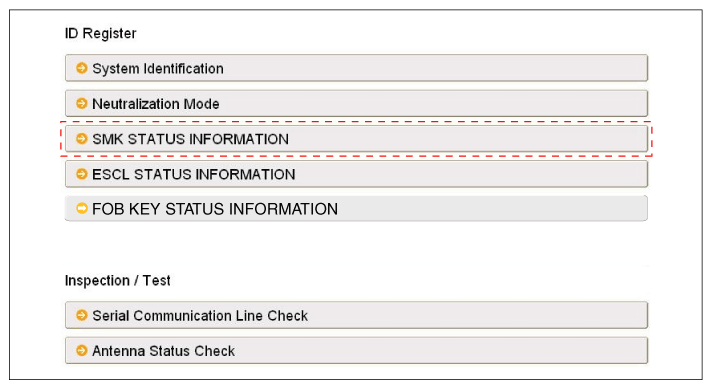
After IGN ON, select the "SMK STATUS INFO".
Fig 1: Selecting SMK Status Information Screen
Courtesy of HYUNDAI MOTOR AMERICA
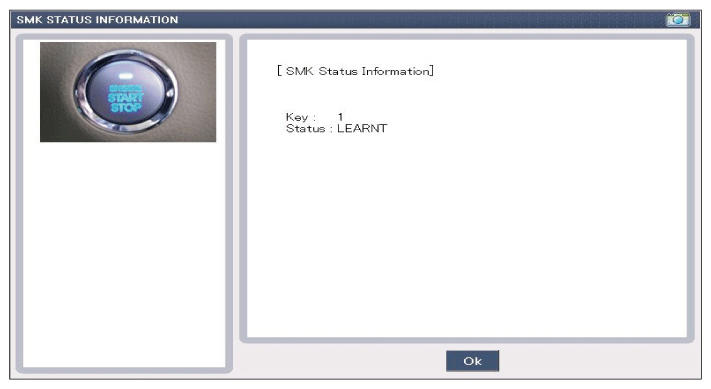
Fig 2: Display - SMK Status Information Screen
Courtesy of HYUNDAI MOTOR AMERICA
 Courtesy of HYUNDAI MOTOR AMERICA
 Courtesy of HYUNDAI MOTOR AMERICA