Brad's Car Manuals
: A 3rd party mirror of CHARM + LEMON car manuals
Home
>>
Hyundai
>>
2016
>>
Azera Limited
>>
Repair and Diagnosis
>>
Body & Frame
>>
Door Locks
>>
Smart Key System
>>
Repair procedures
>>
Inspection
>>
Smart Key Status Check
Smart Key Status Check
Download the full database via torrent (~1.1 TB)
|
Download Brad's custom LEMON patches
Connect the cable of GDS to the data link connector in driver side crash pad lower panel.
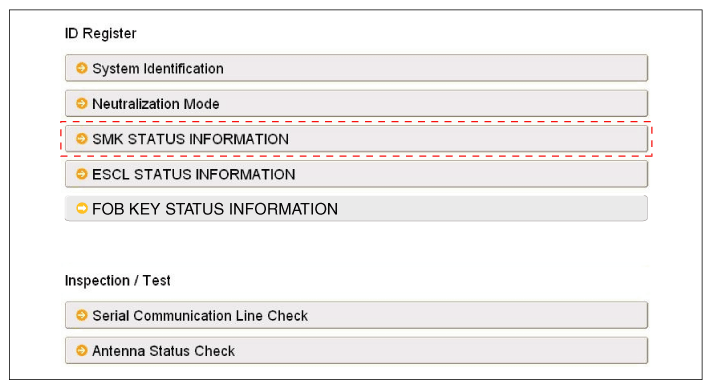
After IGN ON, select the "SMK STATUS INFO".
Fig 1: Selecting SMK Status Information Screen
Courtesy of HYUNDAI MOTOR AMERICA
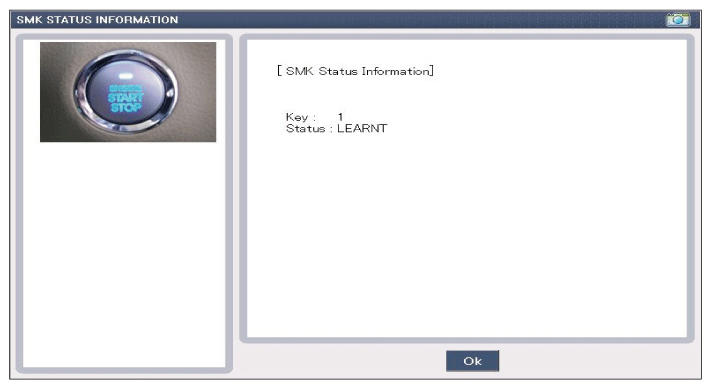
Fig 2: Display - SMK Status Information Screen
Courtesy of HYUNDAI MOTOR AMERICA
 Courtesy of HYUNDAI MOTOR AMERICA
 Courtesy of HYUNDAI MOTOR AMERICA